
Introducing Myself, Dragon’s Desk, and Building Tables of Contents
About Me
Hey folks! Thought I should start off the first one of these by telling you a little bit about myself. My name is James Rivers, I’m the solo developer of Dragon’s Desk, I’m a Christian, I enjoy going on walks with my wife every evening, and I love hiking and camping all over the West Coast of the USA.
I’ve been a player or GM in Starfinder 1e/2e, Pathfinder 2e, Old School Essentials, Axes & Anvils, Call of Cthulhu, and D&D 5e. I’ve listened to hundreds of episodes of TTRPG actual plays, mostly from the Glass Cannon Network and 3d6 Down the Line. I put out 9 episodes of a Starfinder actual play podcast with my friends–it didn’t go too well, as you can tell from the low number of episodes. I extensively homebrewed rules for my play-by-Discord OSE game, and I published a supplement to help GMs optionally resolve combats more quickly.
About Dragon’s Desk
I’ve prepared for sessions with literally a dozen windows and tabs of trackers, notes, rules, modules, and other inspiration open on my computer. Then I read this blog post from Dice Goblin, which planted the seeds of ideas about what could be done for me and others in that kind of predicament. Finally, I couldn’t resist creating and posting a survey to gather feedback from GMs about the tools they use, their processes, their worst frustrations and time-sinks, and their biggest wishlist items for a great prep experience. As it always goes with me, initiating the survey turned out to be a slippery slope straight down into starting Dragon’s Desk.
Since February, Dragon’s Desk has basically been a part-time job for me. I’ve been working on it daily, planning carefully, tuning every detail of functionality and UI, and testing everything thoroughly. I’ve probably spent more time telling my incredibly patient and supportive wife about this on walks than anything else. I want to provide a top-notch reading experience that beats anything else you can get on a computer, combined with highlights and notes and trackers that integrate right into your documents.
I’m building Dragon’s Desk for clean, modern functionality. No AI, no extravagant art or UI. Dragon’s Desk is not going to tell you how to play the game, it’s not going to prep for you, it’s not going to distill an author’s careful creative work into summaries or expand it into flowery read-aloud text. It’s a tool, that I hope will save many GMs time and energy doing the things they already do, while preserving all the wonderful choices of the original artists and authors and editors and layout designers.
One of my favorite parts about Dragon’s Desk is the GMX document format that I designed specifically for TTRPG modules. Instead of only enhancing your experience with static PDFs, I also wanted to radically upgrade the TTRPG reading experience to something you certainly can’t get on any kind of device nowadays. Hand-converting modules into this custom format enables Dragon’s Desk to provide a customizable, reflowable document view just like you’d get on a Kindle or other e-reader.
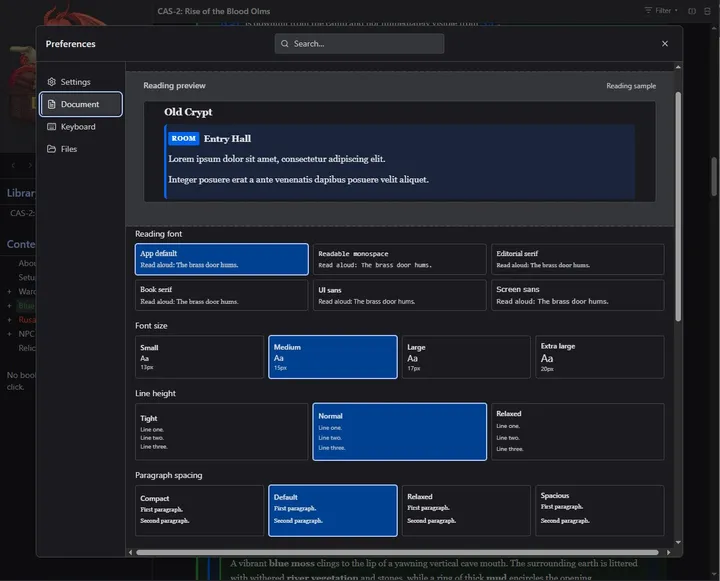
Just some of the document customization options available!
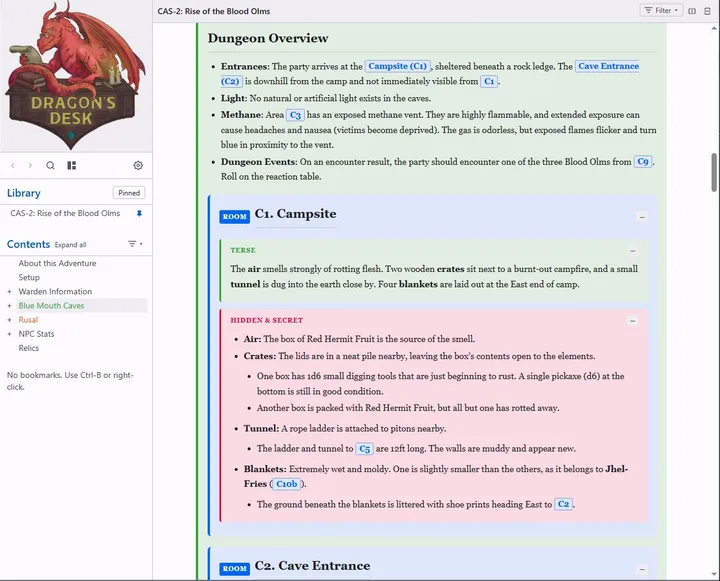
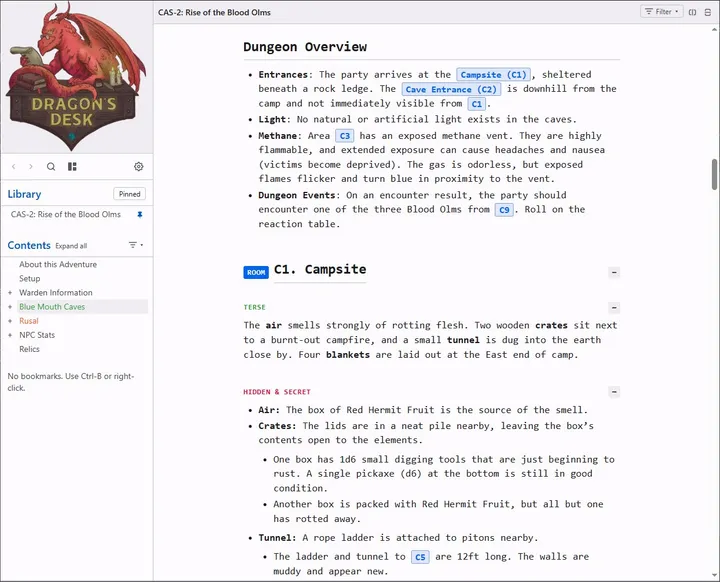
I wouldn’t want to read it that second way, but hey, it’s up to you.
The decision to shun AI does create a business problem for me regarding GMX, since conversion takes time, no matter what tools you set up to help you (more on that in a future post). Furthermore, I can’t just go around converting people’s work into a totally different format and distributing it. I need permission, and those creators and publishers should be compensated. So! if you are a publisher or creator interested in Dragon’s Desk, please email me at [email protected], I’d love to discuss potential arrangements.
Building Tables of Contents
I built out GMX style and functionality first to figure out what I would want from a digital-first reading format, then added in PDFs and sought to replicate as many of those features as possible. One of the things that process led me to realize is that most PDFs do not have a table of contents at all, or only a very incomplete one at most. So I built a system to scan for potential table of contents entries and add them to a list so you can tweak ordering, nesting levels, section types, or manually add in anything the scan misses.
Embedded video (YouTube): https://www.youtube.com/watch?v=sSlwVoYKePY
This is just a tiny module, but it is so SO useful for anything substantial.
Anyways, subscribe here or on YouTube or join my Discord so you don’t miss future updates. I’m hoping to do a couple of these per month at least, mostly showing off current features but probably also rambling about potential additions. Thank you all for reading!